
Free hotel renovation budget template
Know whether the renovation pays before you sign the contractor.
Hotel refurbishments are often approved on a rough capex number and a hopeful new rate. The months with rooms out of service, the closure, the slow first year after reopening and the bank's debt-cover test come up late. This template puts them all in one business case. You enter today's rooms and trading, the new room count and rate, the project budget, the works and closure months, the loan and tax. It compares renovating with doing nothing, month by month for ten years.
Free · Excel
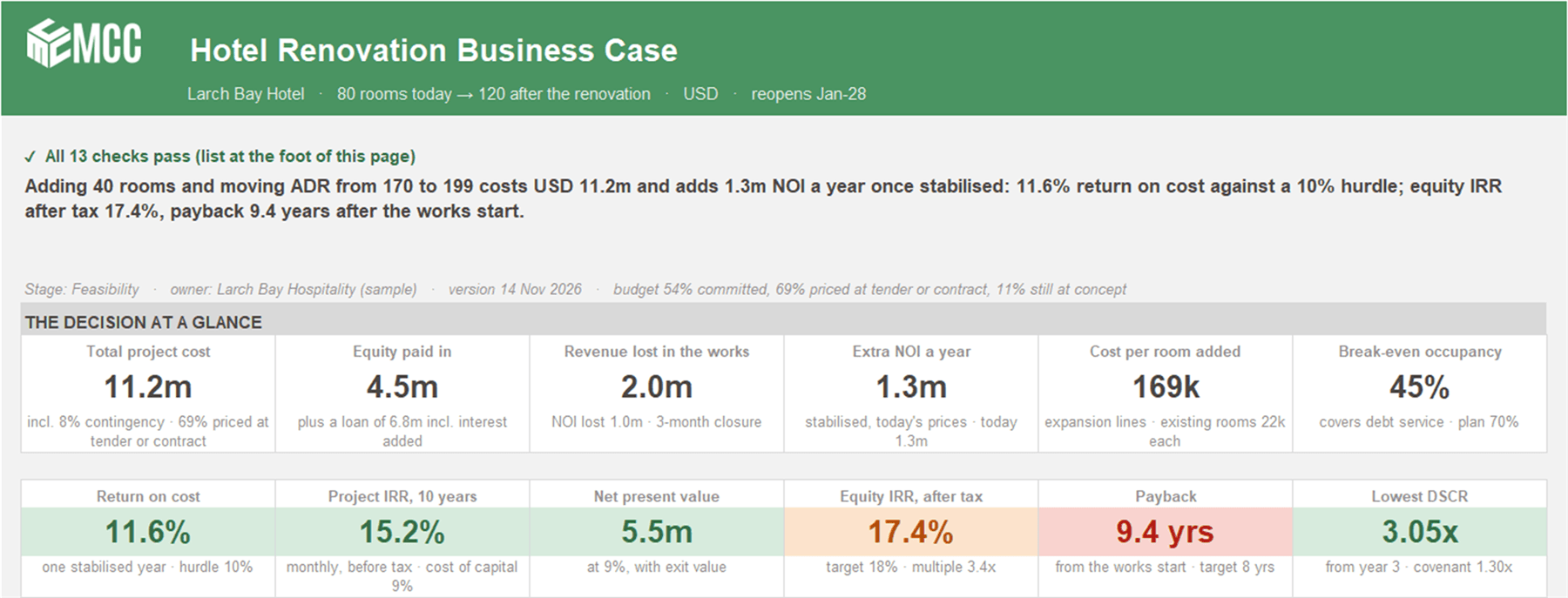
Highlights
The decision on one page
Twelve tiles from total project cost, equity and revenue lost in the works to return on cost against your hurdle, project and equity IRR, NPV, payback and the lowest DSCR, with a one-line verdict in numbers.
Closure and ramp-up counted, not guessed
Works with rooms out of service and a lower room rate, then full closure, ramp-up and stabilised trading. NPV, IRR and payback use these monthly cash flows, so the timing of spend and recovery counts.
Seven stress tests and thirteen checks
Cost overrun, late works, slower ramp-up, higher interest, a lower rate, lower occupancy and a combined downside, each re-run through the whole model. Thirteen checks prove the model adds up, not that the assumptions are right.
Why build a hotel renovation business case month by month?
A hotel renovation business case built month by month shows what the renovation costs while the hotel is a building site. Rooms out of service, the closure and the first year back are when the money goes out and the revenue doesn't come in. A single stabilised year hides all of that.
In the sample, return on cost beats the 10% hurdle and the equity IRR after tax is 17.4%, yet payback runs past nine years and a 10% lower rate turns the NPV negative. The monthly view and the stress tests are what show it.
Where hotel CFOs and owners use it
- Investment committee or owner approval for a refurbishment, extension or repositioning.
- Lender talks, with loan-to-cost, DSCR by year, break-even occupancy and the downside cases in one place.
- Budget season, when the reopening year and ramp-up feed next year's hotel budget.
- A live project running late or over budget. Change the dates or budget lines and see payback move.
What's inside
Six tabs. On the working tabs only the blue cells are inputs, everything else is a formula.
About Vena and MCC
Who built the template, and what changes when the same business case runs in Vena.
Use with AI
Ten ready-made prompts for the AI assistant your company already uses, and a context block that tells the AI how the file works.
Summary
The one-page decision view. Twelve tiles, today against after the renovation, what moves NOI from today to after, NOI by month for renovate against do nothing, and the thirteen checks.
Inputs
Eight sections: property and settings, today and after side by side, the trailing year by month, works phases with closure and ramp-up, a project budget of seven lines plus contingency, funding, tax, and return targets.
Timeline
120 months of the do-nothing and renovate cases, project spend, loan and equity, project and owner cash flows and tax, with year totals.
Returns
Today against after, the NOI bridge, the 10-year case by year, project and equity returns, break-even occupancy, cost per room, how firm the budget is, the loan and DSCR by year, sensitivity grids and the stress tests.
One file, the whole business case
Enter today's trading, the plan and the budget on Inputs. The timeline, the returns and the summary build themselves.
- Hotel Renovation and Expansion Budget
A refurbishment, extension or repositioning of one hotel.
Each budget line is tagged expansion, renovation or shared, with how firm its price is (concept, feasibility, tender or contract), whether it is committed and where the price came from. The loan is drawn with the spend at your loan-to-cost, up to the facility limit, with an arrangement fee, an interest-only period and a choice to capitalise interest until reopening. Tax is simplified: the owner's view of the extra profit.
Tabs
- About Vena and MCC
- Use with AI
- Summary
- Inputs
- Timeline
- Returns
How to use it
Step 1: Enter today
Rooms, the trailing year's occupancy and ADR by month, and today's cost ratios.
Step 2: Plan the project
The new room count and rate, the works phases, closure and ramp-up, the budget lines, funding, tax and your return targets.
Step 3: Read the decision
Twelve tiles and a one-line verdict on the Summary, then the NOI bridge and returns by year.
Step 4: Stress it
Run the seven stress tests, pick any scenario to see it on every tab, and keep all thirteen checks passing.
Use it with AI
The file comes with a Use with AI tab. Attach a copy of the file to the AI assistant your company allows, paste a prompt and fill in the brackets. Each prompt tells the AI to read the tab first, so it knows how the file works and what not to break.
- Ten ready-made prompts, from setting the file up for your hotel and turning a contractor's estimate into the budget to writing the investment memo and preparing for the bank.
- A prompt that checks whether your ramp-up is realistic, and one that stress-tests the case.
- AI can be wrong. Check its numbers against the file and keep all thirteen checks passing before you share anything.
Questions about the template
Is the hotel renovation budget template really free?
Yes. Leave your name and work email and the download appears right away. The file is yours to keep and change.
Do I need Vena to use it?
Not to start. The hotel renovation budget template runs in plain Excel, with no macros and no add-ins. Vena comes in when you run several properties or projects and need approvals and actuals against plan in one place.
Does it show the owner's equity return, not just the project return?
Yes. Project IRR before financing and tax sits next to the owner's equity IRR before and after tax, the equity multiple and cash-on-cash in the first stabilised year. Tax is simplified.
Will it show whether the bank will lend?
It shows what the bank looks at. Loan-to-cost, the loan drawn against the facility limit, DSCR by year tested against your covenant from the first stabilised year, and break-even occupancy.
Can I use it with ChatGPT, Claude or Copilot?
Yes. The Use with AI tab has ten ready-made prompts and a context block for any AI assistant your company allows. Check the AI's numbers against the file before you use them.
Is the sample data real?
No. Larch Bay Hotel, a made-up 80-room hotel adding a 40-room wing, and its numbers are made up, so you can see how the business case works before you type in your own.
The company, customers and figures in this template are made-up sample data. MCC is an independent Vena partner.
Last updated
From a spreadsheet to a process you can trust
When you run several properties or projects and need approvals and actuals against plan, MCC can set the same business case up in Vena for you.
Talk to our team- 1
Use this template
Free, in plain Excel. Change the blue inputs and the rest updates.
- 2
Have MCC set it up in Vena
Keep the Excel layout, and add one Vena data model, approvals and an audit trail. We build it and check that it ties.
More templates
- Planning
- Hospitality
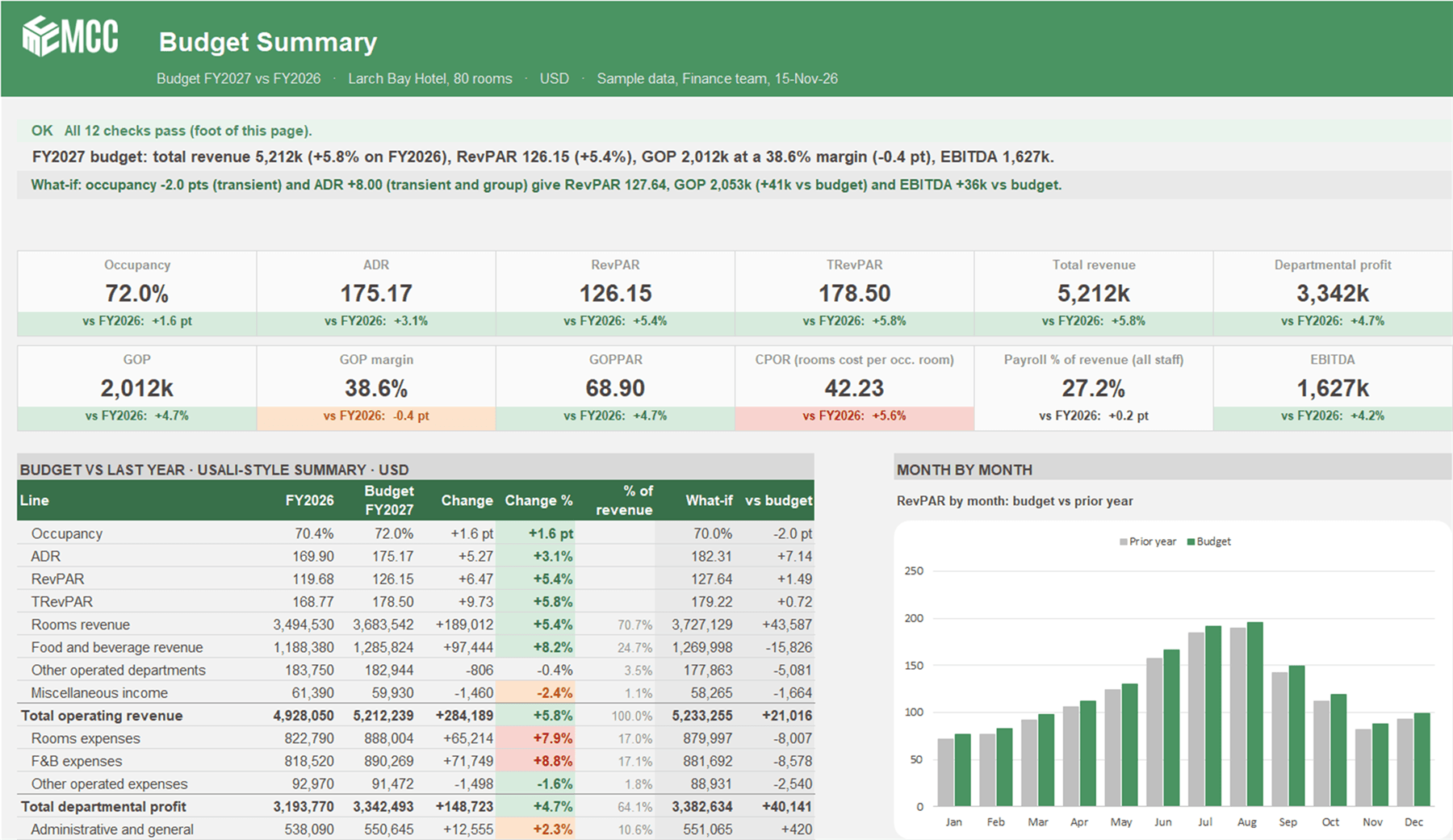
Hotel Budget by Department
A driver-based annual hotel budget. Occupancy and ADR by segment, covers by outlet, a USALI-style departmental P&L to GOP and EBITDA, and a what-if in one step.
Free · ExcelDownload free
- Planning
- Forecasting
- Cash
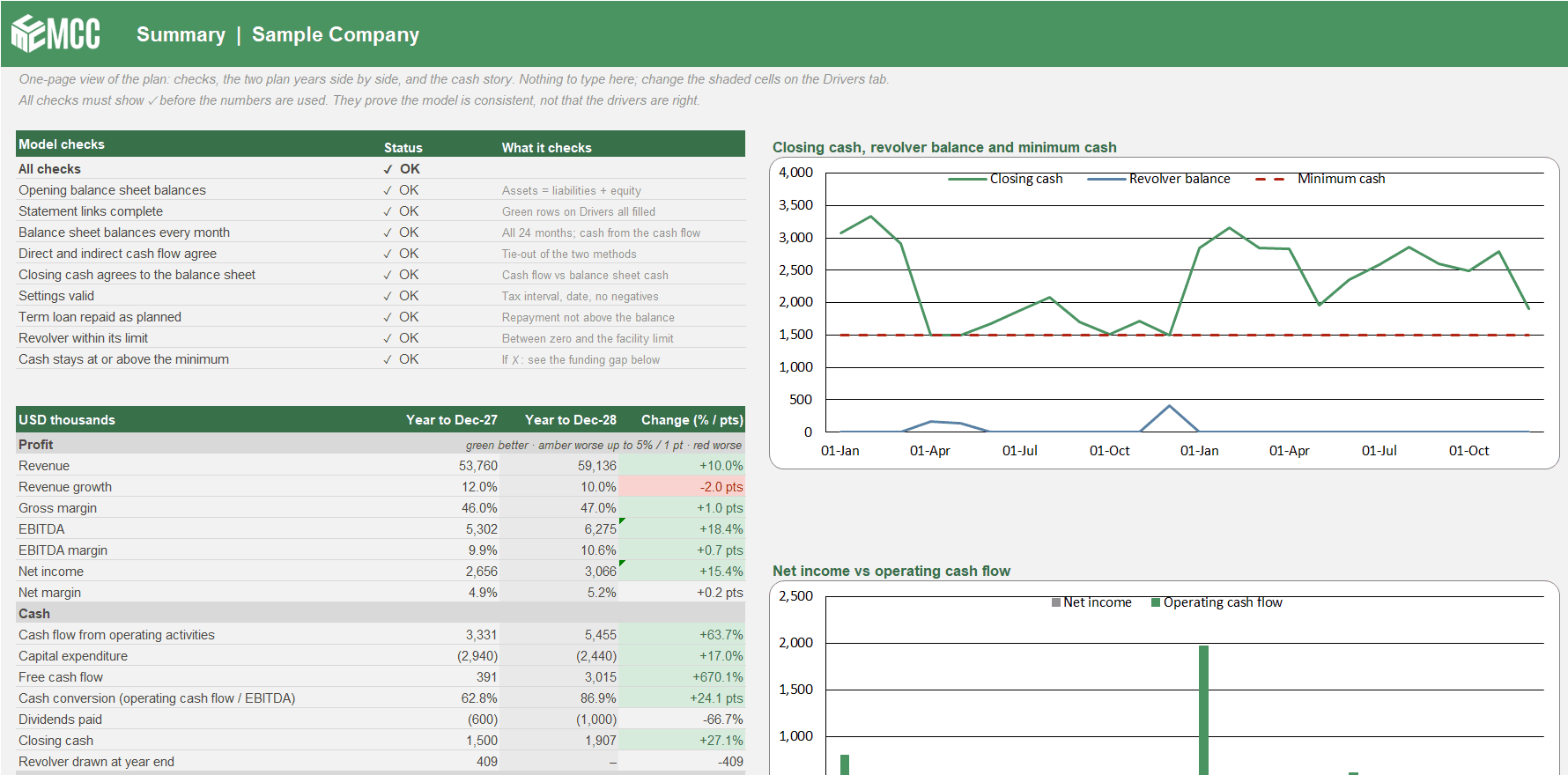
Three-Statement Driver Model
Your P&L, balance sheet and cash flow linked month by month for 24 months. Change a driver and profit, working capital, cash and the revolver all move together.
Free · ExcelDownload free
- Cash
- Forecasting
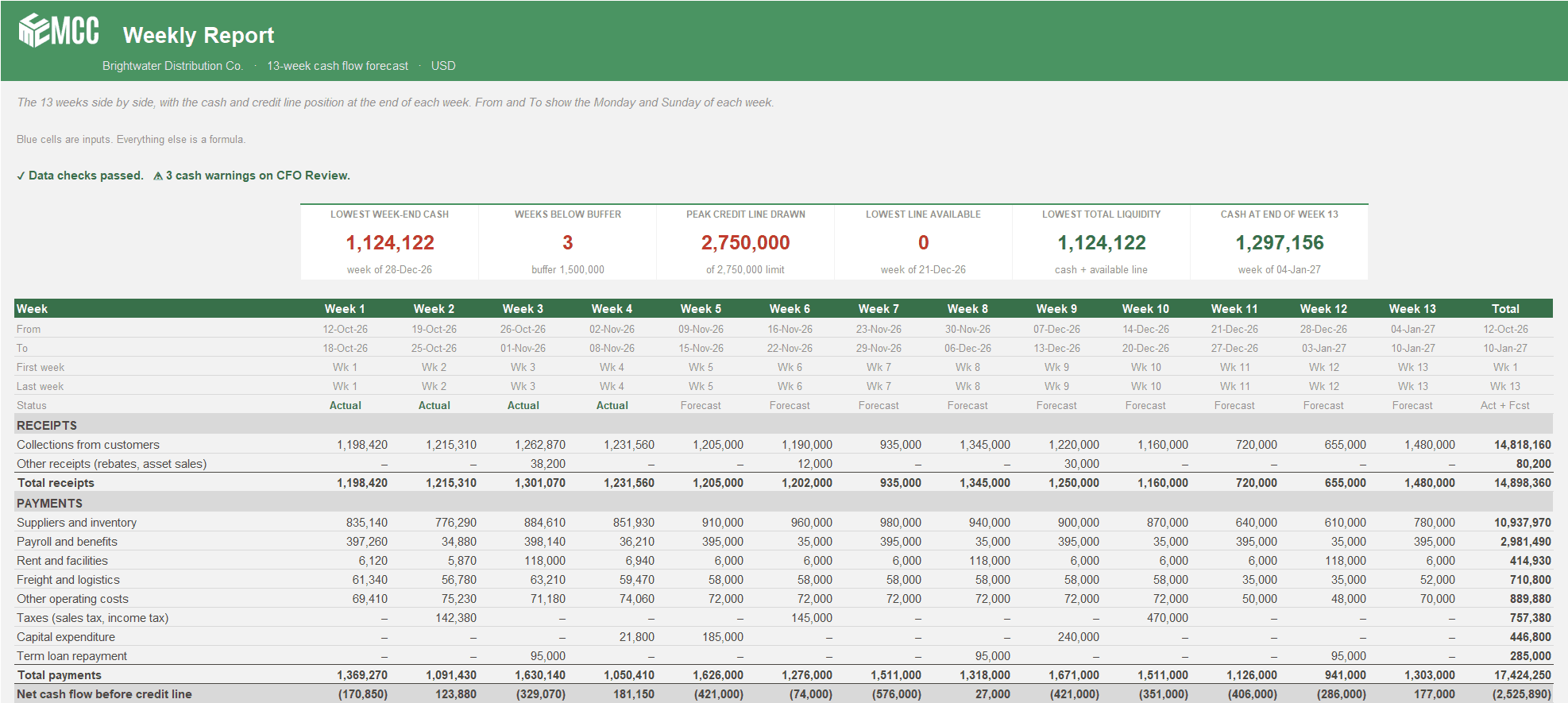
13-Week Cash Flow Forecast
See every week of cash for the next quarter, when you'll touch the credit line, and whether the bank statement agrees. Two versions, Weekly or Weeks + Months.
Free · Excel, 2 versions: Weekly and Weeks + MonthsDownload free
Got a problem a template doesn't cover?
Talk to our team about it. Not ready for a call? Watch the Finance Speedrun and see how we solve a real finance problem live every week.